
Earning Program #
The earning program is designed to incentivize customers through a point distribution system.
What is an earning program?
An earning program allows customers to earn points by completing actions set by the merchant. These actions can include placing an order or signing up. The number of points awarded depends on the rules you configure for each action. Earning programs help you reward customers for engaging with your store and encourage them to return.
Why do you need an earning program?
Merchants use earning programs to reward customers with points for every purchase. It adds value, encourages repeat orders, and keeps customers engaged without relying on constant discounts. Further, these points are exchanged with redeeming programs to make more use of them.
There are two ways to configure the earning program on the inback dashboard:
Sign-Up
#
Merchant Interaction:
Here, the earning program is configured through customer sign-up. When a new customer signs up on the website, they receive points, set according to the merchant. For example, the merchant may set any number of points on the sign-up field.
- 10 points for new user sign-up.
How to make an earning program on inback?
- Find inback on your Shopify e-commerce store.
- On the left panel, find the Loyalty Program section. Select it.
- Once you’re on the loyalty program section, you’ll find an Earning program tab. Click on it.
- Look for the signup option.
- There’ll be a pop-up window called ‘Sign-Up.’
- Here, set any number of points in the text field. For example, 1, 10, or 20 points.
- Select Done.
- Congratulations! You’ve configured the sign-up earning program
End User Interaction:
What does an earning program mean for the end users?
When a new user signs up on a Shopify store, they get reward points set by the store’s merchant. These points are shown in their widget, so customers can easily see the new points they’ve received.This widget is available on the e-commerce store and shows all the details about the customer’s current status. Customers can use it to check their current loyalty points anytime. To know more about the end-user widget, skip to the widget subtopic.
Place Order #
Reward customers every time they shop. With every purchase, the customer gains points that act as a reason for them to come back to the website and make repeat purchases.
Merchant Interaction:
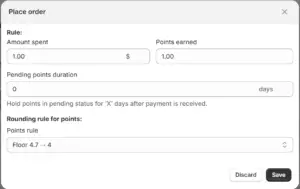
Criteria for earning points through placing orders:- The merchant can set how much money a customer needs to spend.
- And how many points they’ll earn for that amount.
How to configure Place Order in the earning program?
- Select the Loyalty Program on the left panel of the inback app.
- Earning Program section will be opened.
- Tap on “Create” icon to edit Place Order.
- A pop-up widget of Place Order will emerge.
- Set the ‘Rule’ according to your preference.
- Enter the ‘Amount Spend’ and ‘Points Earned.’
- Click on Save.
- You’ve configured the place order setting.
Example: Now every time a customer shops from the website, the points will be rewarded to them according to the amount spent.
Points will be rewarded upon purchase, further they can be exchanged with redeeming program. There’ll be a rounding-off system to reward points in a systematic way.


