
What Are Tier Privileges? #
Tier privileges are continuous benefits that customers enjoy as long as they remain in a specific VIP tier. These perks are not one-time; they are always available to customers while they hold their tier status.
How does tier privilege work? #
- Tier privileges are benefits that customers get automatically when they are in a specific tier.
- Privileges automatically apply only in points multiplier and can be redeemed repeatedly without needing points.
- There may be multiple ongoing privileges per tier, mixing types or having multiples of the same type.
- Coupons cannot stack. Only one ongoing privilege coupon of each type (Created by merchant) can be active in the customer’s “My Coupon” section at a time, except for multiplier points, which apply automatically without coupon codes.
For example, Mr. A is in the Gold tier. He redeems a “Free Shipping” coupon. It’s saved in his “My Coupon” section. Before he uses this coupon, he cannot take another “Free Shipping” coupon. He can also have a “10% Off” coupon at the same time—just one of each kind. Multiplier points (like double points for every order) always apply automatically, no coupon required
Note: The main difference between “Entry Reward” and Ongoing Privileges” is that customers will get the entry reward directly in the “My coupon” section. The customers don’t have to redeem it like “ongoing privileges.”
Customer Coupon Flow of Entry Rewards #
View reward
Customers can see the entry reward in the Earning Programs section of the widget.
Reward added to My Coupons
Once the customer becomes eligible, the reward is directly added to the My Coupons section.
Copy the code
The reward appears as a coupon with a unique code.
Use at checkout
The customer can copy the code and apply it during checkout to get the benefit.
Types of Entry Rewards #
These rewards are given to customers whenever they enter a new tier. These are one-time rewards. Entry rewards are not mandatory. Merchants can choose not to set up entry rewards.
Bonus Points #
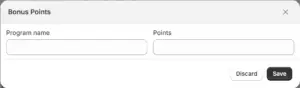
Bonus points are a one-time reward given to customers when they enter a new VIP tier, providing an immediate points boost as a welcome gift.
How it works:
- Set a bonus points reward for each tier (e.g., the Silver Tier gives 50 bonus points upon entry).
- Customers only receive this reward once per tier—if demoted and returned to the same tier, they do not get the bonus points again.
- If the entire VIP tier program is reset, customers can earn these entry bonus points fresh.
Reward setup:
- You can only have one type of bonus points entry reward per tier.
- If you want to change the reward, Edit it or delete the existing one, then add a new bonus points reward.
- Merchants can delete it at any time.
- Bonus points are credited directly to the customer’s loyalty points balance and are visible immediately.
Discount #
- Free shipping
- Free gifts
Types of Ongoing Privileges #
#
Multiplier Points (Place Order) #
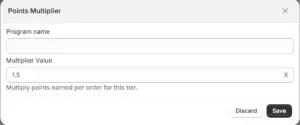
Multiplier Points give VIP customers extra loyalty points on their purchases. Instead of earning the standard “x” point per $1 or $”Y”, they might earn 2x, 1.5x, or 2.5x points. Multiplier Points is related to Place Order from Earning Program.
Note: If Place Order isn’t configured, then customers won’t get Points Multiplier privilege. Here’s the multiplier point setup:
- Set up as an ongoing privilege for higher tiers (e.g., Silver gets 2x points, and Gold gets 3x points).
- Multiplier automatically applies to every purchase—no coupon codes needed.
- Points disbursing from Multiplier Points privilege follow your existing rules (pending period, rounding) configured at place order earning program and multiply the base earning rate.
Example:
If your base program gives 1 point per $1 spent, and you set the Gold tier with a 2.5x multiplier:
- Gold customer spends $100 → earns 250 points instead of 100 points.
Free Shipping #
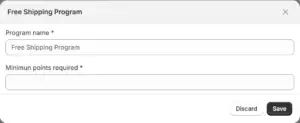
- Free shipping on orders that meet a merchant-defined minimum order value.
- Merchants can set unique minimum order thresholds for each tier (e.g., $100 for Silver, $50 for Gold).
- Customers receive a coupon displayed in their “My Coupon” section with codes to use at checkout.
- Customers can redeem a coupon from the tier section to ‘My coupon’ section, and from there they can get a code that can be used during checkout.
Discount Program #
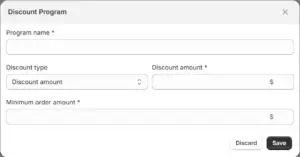
- Percentage or fixed amount discounts on orders.
- Merchants define discount values and minimum order requirements.
- Multiple discount programs can be set within a tier.
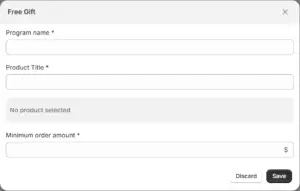
Free Gift #
- A free product coupon customers can redeem by adding the specified item to their cart at checkout.
- Products out of stock cannot be selected. Variants are treated as separate products for gifting.
- Minimum order values can be set similarly to discounts and free shipping.
- The customer widget will remind customers to add the free gift to the cart.
How to Manage Tier Privileges?
- Merchants have full control: add, edit, or delete privileges anytime.
- Privileges appear in the VIP section widget for customer visibility and redemption.
- After redeeming one ongoing privilege coupon, customers must use it before redeeming another (except multiplier points).


