
The Customers page displays a list of all customers who have interacted with your store and your loyalty program.
Each row represents one customer, and in that row you’ll find:
- Customer email
- Phone number
- Tier status
- Current points balance
This list updates automatically as customers place orders or earn points.
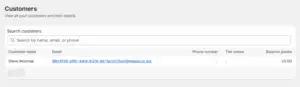
Customer list view #
Once you open the Customer Section, you’ll find the customer list with the following details:
- Customer name
Every customer’s name who has interacted in the form of purchase will appear here. - Email
Every customer in the loyalty program is linked to an email address. You’ll find each customer’s Email I’d in front of their names. - Phone number
The customer’s phone number will be shown beside the email ID. - Tier status
Tier status indicates the tier the customer currently resides in. It may be Silver, Gold, or any customized name of the tier. - Balance points
It shows how many points the customer currently has available to redeem.
Searching for a customer
At the top of the customer list, you will see a search bar.
You can search using:
- Customer name
- Customer email
- Customer phone number
The customer section helps when you want to quickly find out about a specific customer during support, verification, or review.


