This is the guide to set up the tiers of your VIP tier loyalty program.
Base Tier Set-Up #
All customers start from here before the upgrade. The Base Tier has an entry requirement of zero (customers need to spend 0$ to enter the base tier) and hence cannot be deleted. Here are a few things you can change in the base tier:
- Base tier name
Click on the edit button - Entry Reward:
You can assign an optional entry reward but no ongoing privileges.
Additional Tier Set-Up #
To add multiple tiers:
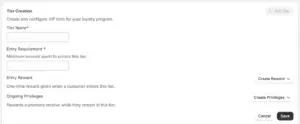
Click “Add Tier” under Tier Creation and set:
- Tier Name (e.g., Silver)
- Entry Requirement (e.g., $500 spent)
- Entry Reward (optional; one-time benefit, e.g., coupon)
- Ongoing Privileges (e.g., free shipping, points multiplier)
- You can add multiple Ongoing Privileges by clicking on “Create Privileges” and adding your preferred reward.
More about additional tiers
- Tiers can be deleted without losing data of existing customers; they continue enjoying existing perks until reassessment or upgradation to another tier.
- Deleted tiers cannot be restored.
- The deleted tier will be visible even if one customer resides in that tier. The tier will be fully deleted only when there are no customers in the deleted tier.
Example: Suppose Mr. X, a merchant, deletes their Platinum Tier and 5 people exist in the tier at the time of deletion. These 5 people will continue receiving the Platinum tier until their next reassessment cycle. And only then the tier discarded from merchant’s dashboard.